Millions of people search for a way to play Roblox free online no download every single day, and most of them end up on pages that dodge the real answer. Some sites promise a magic browser button that just works. Others quietly send you to download links anyway. This guide skips the sales pitch and tells you exactly what actually works in 2026, what does not, and what to watch out for along the way.
Roblox is one of the biggest gaming platforms in the world, with hundreds of millions of people logging in every month to build, explore, and play experiences made by its community. Since Roblox is technically a creation platform rather than a single game, the way you access it matters more than people assume.
If you are on a school Chromebook, a locked-down work laptop, or a phone with no storage left, you are not out of options. You just need to understand which methods are legitimate and which ones are asking for trouble.
Can You Actually Play Roblox Free Online With No Download?
The short answer is yes and no, depending on what you mean by “playing Roblox.”
If you mean the official Roblox platform, running through Roblox’s own servers with your real account, then no, there is currently no official browser version. Roblox requires the Roblox Player app on every platform, including Windows, Mac, iOS, and Android. That has been true since 2012.
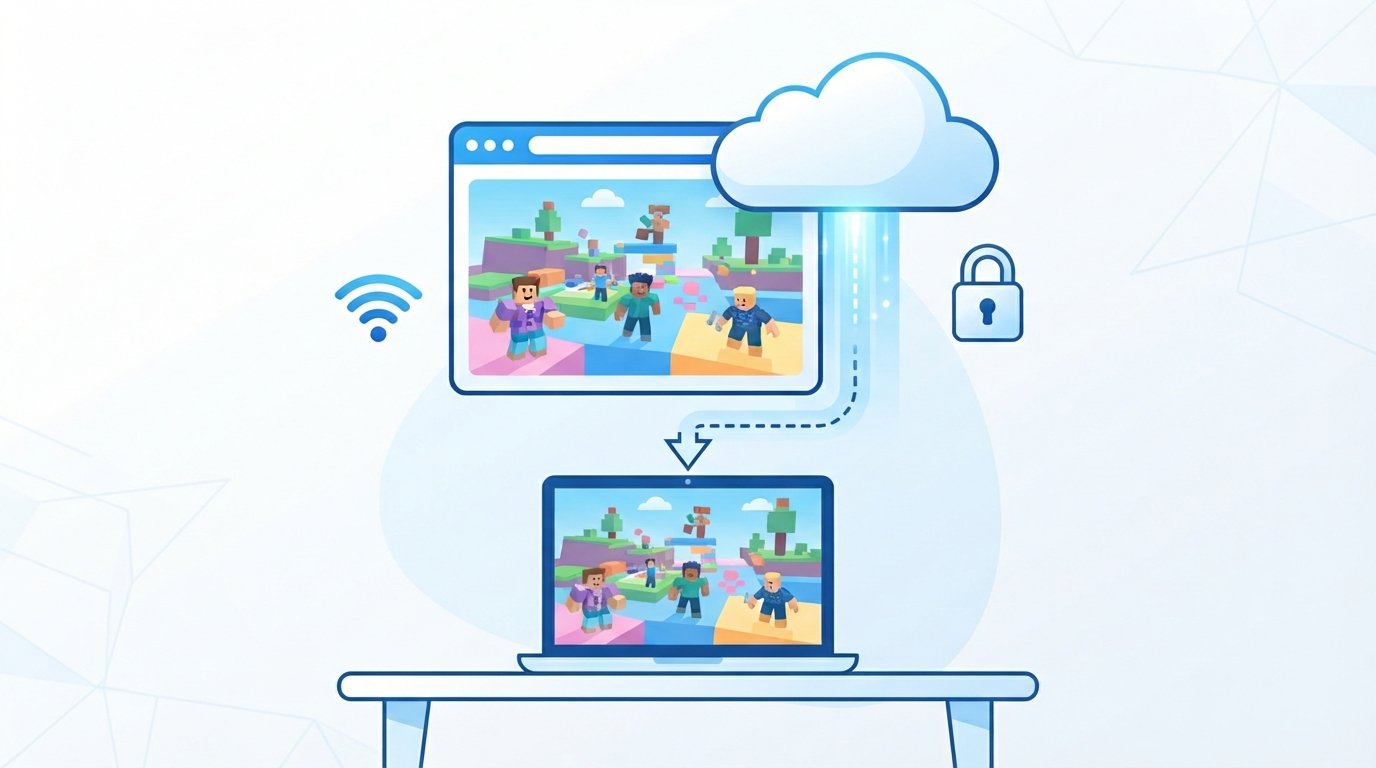
If you mean accessing Roblox experiences through your web browser without installing anything on your own device, then yes, this is absolutely possible. Third party cloud gaming and streaming services run the Roblox app on their own remote servers and stream the video feed to your browser. Nothing gets installed locally. You just watch and control the game the same way you would watch a video call.
There is also a third category worth knowing about. Several websites host Roblox style games, meaning block based, user generated style games inspired by Roblox but not actually running on Roblox’s platform. These load instantly in any browser with zero downloads and zero accounts.
So the honest breakdown looks like this. Real Roblox online requires either a cloud streaming service or the official app. Roblox style games online require neither, but they are not the actual Roblox platform.
Why Roblox Never Built A True Browser Version
Roblox used to have an embedded browser inside its own client back in the early days, but that was removed in 2012 when Roblox rebuilt its player around a dedicated desktop and mobile app instead.
There are practical reasons for this. Roblox runs a real time 3D engine, a physics system, and voice and text moderation tools that need direct access to your device’s graphics hardware. Modern web browsers have gotten much better at running 3D content, but Roblox also relies on anti-cheat software called Hyperion, which is built into the desktop client and needs deeper system access than a browser sandbox typically allows.
Roblox has also stated that account logins should only happen through the official Roblox app or the official roblox.com pages, and that the company does not create or endorse browser extensions for playing the game. This is part of why cloud gaming has become the go to workaround instead of a browser plugin.
In plain terms, Roblox chose stability, security, and anti-cheat protection over browser convenience. That tradeoff is why the “no download” crowd had to get creative.
The Real Options For Playing Roblox Online Without Downloading
Here are the methods that genuinely work right now, ranked from most common to most niche.
Cloud Streaming Sites Like now.gg, EasyFun, and CloudMoon
These platforms run a version of Roblox on their own servers, usually the mobile app version, and stream it to your browser through a video feed. You click play, wait a few seconds for the connection, and then control the game with your mouse and keyboard or touch controls.
The upside is real. Nothing downloads to your computer, so there is no risk of a bad installer or a virus hiding in a download link. This works on Chromebooks, locked school computers, and older laptops that could never run the full Roblox client smoothly.
The tradeoffs are also real. Most of these services stream the mobile version of Roblox rather than the full PC client, so games built around keyboard and mouse controls can feel clunky. Free tiers often come with session time limits, ads, and occasional queue times during busy hours. Performance depends heavily on your internet connection, since you need roughly 5 to 10 Mbps of stable bandwidth for a smooth stream.
You will also need to log into your actual Roblox account through their interface to save progress, which brings up account safety questions covered later in this guide.
Paid Cloud Gaming Services Like Boosteroid and Shadow
A step above the free streaming sites are subscription cloud gaming services. Boosteroid supports Roblox through a bring your own game setup, meaning you link your existing Roblox account and stream the full PC client at higher quality than the free options. Shadow works similarly, giving you a full cloud PC that can run the real Roblox desktop app.
Popular services like GeForce NOW and Xbox Cloud Gaming do not currently support Roblox, despite frequent requests from their communities, so do not expect to find it there yet.
These paid options are worth mentioning for completeness, but they involve a subscription fee, which moves them outside the truly free category most people searching for Roblox free online no download are actually looking for.
Roblox Style Games You Can Play Free With Zero Downloads
If your real goal is quick, casual, block style gameplay rather than the official Roblox platform itself, sites like Playgama, Playhop, BloxGames, and kevin.games host large libraries of Roblox inspired browser games. Think obby style obstacle courses, tycoon games, horror escapes, and simulator style titles, all running instantly in your browser.
These are not affiliated with Roblox Corporation, and they will not sync with your real Roblox account, inventory, or friends list. What they do offer is instant play with no account creation, no login, and no download at all, which makes them a solid choice for a quick session on any device.
How To Play Roblox Free Online No Download Step By Step
Here is the general process for using a cloud streaming service, using the most common method as an example.
- Open your browser and go to a reputable Roblox cloud streaming site.
- Search for Roblox or browse the featured Roblox section on the homepage.
- Click play and allow a moment for the server connection to load.
- Log in with your Roblox credentials only if you want your progress and inventory to sync. Skip this step if you just want to browse or test the service first.
- Use your mouse, keyboard, or on screen touch controls to play once the stream loads.
- Save and exit properly through the in game menu before closing the tab, since abrupt closures can sometimes lose recent progress.
If you would rather skip the login step entirely, choose one of the Roblox style browser game sites instead, since most of those load straight into gameplay with no account required.
Is Cloud Gaming Safe For Your Roblox Account
This is the question people should be asking more often, and it deserves a straight answer.
Cloud streaming itself is generally safe for your device, since the game runs on a remote server rather than your computer. That removes the risk of malware hiding inside a fake installer, which is one of the more common Roblox related scams.
Account safety is a separate matter. When you log into your real Roblox account through a third party site, you are trusting that site with your credentials. Reputable cloud gaming platforms use encrypted connections, but you are still handing your login to a company that Roblox does not officially partner with or vouch for.
There have been reports of large batches of Roblox linked account data appearing on hacker forums, though investigations traced most of these back to infostealer malware on individual users’ own devices rather than a breach of the streaming platform itself. Still, it is a useful reminder to stay careful.
A few practical habits go a long way here.
- Turn on two step verification in your official Roblox account settings before using any third party service.
- Consider creating a separate secondary Roblox account for cloud gaming experiments, keeping your main account and any purchased items untouched.
- Never enter your Roblox password on a site that is not the official login screen unless you fully understand what that specific cloud service does with it.
- Watch for unexpected login alert emails from Roblox. These are usually just confirming that the streaming service logged in on your behalf, but they are worth double checking.
Playing Roblox Online On A Chromebook Or School Computer
Chromebooks and school issued laptops are one of the biggest reasons people search for a no download Roblox option in the first place. Many of these devices block software installations entirely, run limited storage, or sit behind school network restrictions that block roblox.com outright.
Cloud streaming sites are usually the most realistic path here, since they only require a browser and an internet connection rather than admin permissions to install anything. That said, school networks frequently block known gaming and streaming domains, so results vary a lot from one school district to another.
If your school network blocks everything gaming related, Roblox style browser games hosted on general purpose gaming portals sometimes slip through filters that specifically target Roblox by name, though this depends entirely on how your school configures its firewall.
What You Need For Smooth Roblox Browser Gameplay
A few basic requirements make the difference between a smooth session and a frustrating one.
- A stable internet connection of at least 5 to 10 Mbps for cloud streaming, with wired or strong Wi Fi connections performing noticeably better than weak signals.
- An updated browser, since Chrome, Firefox, and Microsoft Edge all handle modern cloud streaming better than outdated or unsupported browsers.
- A recent device, since even though the heavy processing happens on remote servers, your device still needs to decode and display the video stream without lag.
- Closed background tabs and apps, since streaming is bandwidth and resource hungry, and too many open tabs can cause stuttering.
Common Mistakes People Make When Trying Roblox Without Downloading
A few patterns show up again and again with new users trying this for the first time.
Entering a main Roblox password on an unfamiliar site without checking whether the service is reputable is the most common mistake, and it is also the easiest one to avoid with a bit of research first.
Expecting full PC level graphics and controls from a mobile streamed version is another frequent letdown, since many free cloud services stream the mobile client rather than the desktop one.
Assuming Roblox style games and the real Roblox platform are the same thing causes confusion too. They share a visual style, but progress, purchases, and friends lists do not carry over between them.
Ignoring session time limits on free tiers is another common surprise, since many free cloud gaming accounts cap you at a set number of minutes per day before asking for a paid upgrade.
Frequently Asked Questions
Final Thoughts
There is no single trick that makes the real play Roblox free online no download run natively in a browser, and any page claiming otherwise is oversimplifying things. What does exist is a genuinely useful set of cloud streaming services that let you access your real account without installing anything, plus a separate world of Roblox style browser games for quick, account free sessions.
Pick the option that matches what you actually need. If you want your real progress and friends, use a reputable cloud streaming service and protect your account with two step verification. If you just want quick, casual block style fun, the browser only alternatives will get you playing in seconds.
Source Links
- https://en.wikipedia.org/wiki/Roblox
- https://en.help.roblox.com/hc/en-us/articles/115004647846-Roblox-Terms-of-Use
One thought on “Play Roblox Free Online No Download The Honest Guide To Every Real Method”